> ## Documentation Index
> Fetch the complete documentation index at: https://docs.chainstack.com/llms.txt
> Use this file to discover all available pages before exploring further.
# Use one API key across multiple chains with Multichain API
> Create a multichain endpoint on Chainstack, attach your Global Nodes and Dedicated Nodes, and call every attached chain with a single API key.
A multichain endpoint gives you one API key that works on every Global Node and Dedicated Node you attach to it. You create the endpoint on Chainstack, add the nodes you want, and use the same key in the URL of each chain instead of managing one key per node.
Multichain API is available on every plan, including Developer.
## What is a multichain endpoint?
A multichain endpoint is a named group of your existing nodes with one shared API key. The key authorizes requests to each node in the group, so you can put a single secret in your environment variables or CI instead of one per chain. Your nodes, their own endpoint URLs, and their own API keys stay as they are.
An endpoint can hold the following:
* One [Global Node](/docs/global-elastic-node) per protocol and network
* Any number of [Dedicated Nodes](/docs/dedicated-node)
Regional Nodes can't be attached. The same node can belong to several endpoints.
## Create an endpoint
On Chainstack, click **Multichain API** in the left menu.
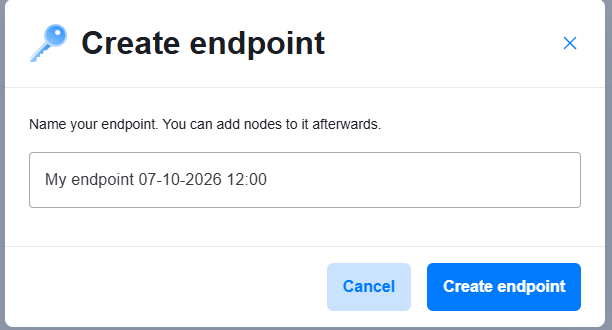
Click **Create endpoint**, enter a name, and click **Create endpoint** again. The name is up to 30 characters. Chainstack opens the new endpoint's page, which shows the API key.
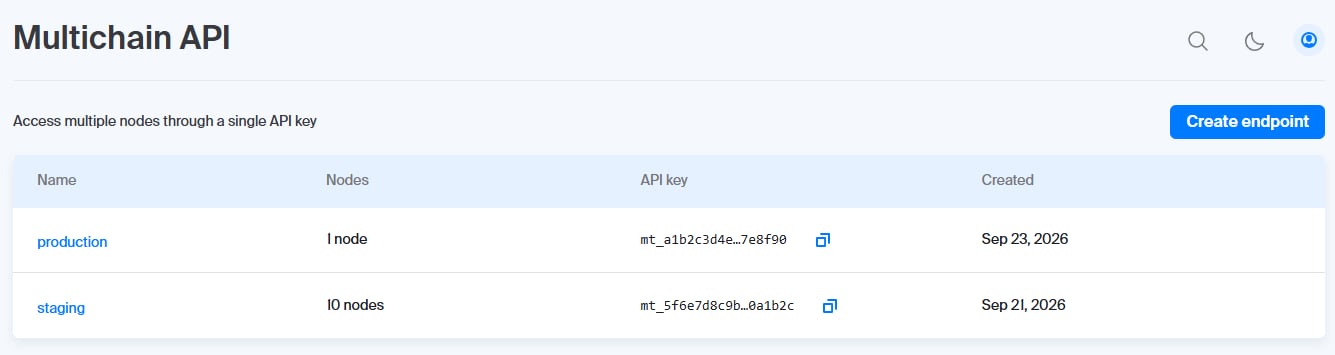
The endpoint appears in the **Multichain API** list with a masked API key.
 A new endpoint has a key and no nodes. The key authorizes nothing until you add a node. The **Multichain API** page lists your endpoints with their node count, a shortened API key, and the creation date.
 ## Add nodes to an endpoint
On Chainstack, click **Multichain API** and click the endpoint name.
In **Connected nodes**, click **Add node**. Search for a node by name, or filter the list by type (**Global** or **Dedicated**), and click **Add** next to each node you want. Click **Done** when finished.
The nodes appear in **Connected nodes**, and each one is listed in the **Node** selector under **Connection details**.
## Add nodes to an endpoint
On Chainstack, click **Multichain API** and click the endpoint name.
In **Connected nodes**, click **Add node**. Search for a node by name, or filter the list by type (**Global** or **Dedicated**), and click **Add** next to each node you want. Click **Done** when finished.
The nodes appear in **Connected nodes**, and each one is listed in the **Node** selector under **Connection details**.
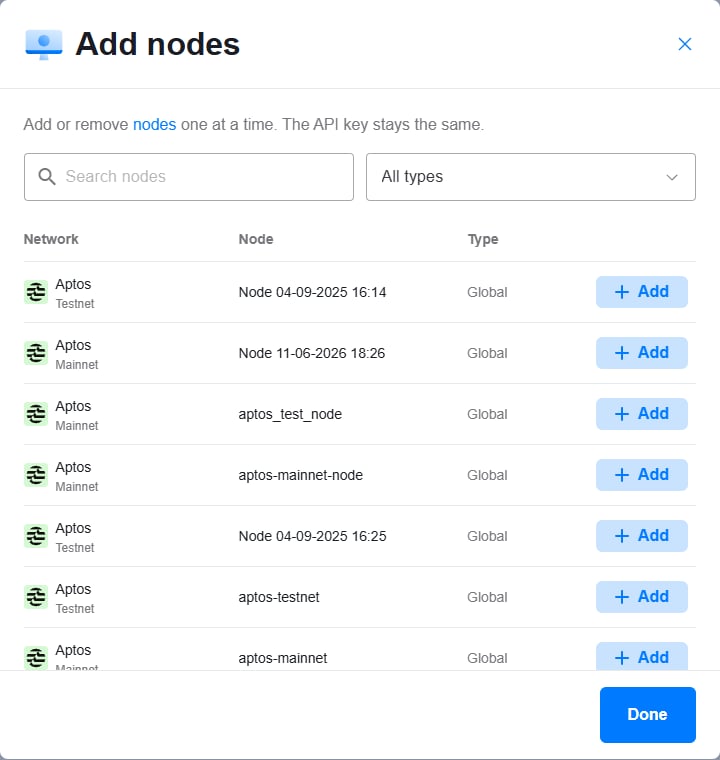 You can add or remove nodes one at a time at any time. The API key stays the same.
A node that can't be added is dimmed in the list, and hovering over it shows the reason. For example, an endpoint can't hold a second Global Node for the same protocol and network.
## Call a chain with the key
Each attached node has its own URL on the endpoint page. To get it, open the endpoint, select a node in **Connection details**, and copy the **HTTPS endpoint** or the **WSS endpoint**. The key is already part of the URL.
For a Global Node, the URL uses the `core.chainstack.com` host with the chain and network in the subdomain. A Dedicated Node uses its own host, so copy the URL from **Connection details** instead of building it yourself.
The following example sends the same request to an attached Ethereum Mainnet Global Node and an attached Solana Mainnet Global Node with one key:
```bash cURL theme={"system"}
export CHAINSTACK_MULTICHAIN_KEY="YOUR_MULTICHAIN_API_KEY"
curl -X POST "https://ethereum-mainnet.core.chainstack.com/$CHAINSTACK_MULTICHAIN_KEY" \
-H 'Content-Type: application/json' \
-d '{"jsonrpc":"2.0","method":"eth_blockNumber","params":[],"id":1}'
curl -X POST "https://solana-mainnet.core.chainstack.com/$CHAINSTACK_MULTICHAIN_KEY" \
-H 'Content-Type: application/json' \
-d '{"jsonrpc":"2.0","method":"getSlot","params":[],"id":1}'
```
Replace `YOUR_MULTICHAIN_API_KEY` with the key from your endpoint page. Each call returns a normal JSON-RPC result for its chain.
A request to an attached chain returns a valid response. A request to a chain that isn't attached returns `401 Unauthorized`.
## How requests are handled
* Requests to a chain follow the node behind it — the rate limits and [access rules](/docs/access-rules) you set on that node apply.
* A request with the key to a chain whose node isn't attached to the endpoint returns `401 Unauthorized`.
* When you delete a node on Chainstack, the node is removed from its endpoints automatically. The endpoint and its key stay.
* Removing the last node from an endpoint leaves the endpoint and its key in place with no nodes.
* A node that isn't running has no connection details until it runs again.
## Find the API key
Open the endpoint on the **Multichain API** page. The full key is under **API key**, and **Copy** puts it on your clipboard. The key starts with `mt_` and is always available on the endpoint page. The list shows a shortened key, and its copy button copies the full value.
Treat the key as a secret. See [Best practices for securing your Chainstack endpoint](/docs/best-practices-for-securing-your-chainstack-endpoint) for guidance.
## Replace an API key
An endpoint's key can't be rotated. To replace a key, for example after it leaks:
Create an endpoint and add the same nodes to it.
Switch your environment variables or CI secrets to the new key.
Open the old endpoint and delete it, as described in the next section.
## Remove a node or delete an endpoint
To remove a node from an endpoint, open the endpoint, and click the trash icon next to the node in **Connected nodes**. Requests to that chain with the key return `401 Unauthorized`, and the other chains keep working.
To delete an endpoint, click **Delete endpoint** on its page, or click the trash icon in its row on the **Multichain API** list. The confirmation shows how many nodes the key stops working on. After you click **Yes, I'm sure**, the key stops working on every attached node. This action can't be undone, and your nodes are not deleted.
You can add or remove nodes one at a time at any time. The API key stays the same.
A node that can't be added is dimmed in the list, and hovering over it shows the reason. For example, an endpoint can't hold a second Global Node for the same protocol and network.
## Call a chain with the key
Each attached node has its own URL on the endpoint page. To get it, open the endpoint, select a node in **Connection details**, and copy the **HTTPS endpoint** or the **WSS endpoint**. The key is already part of the URL.
For a Global Node, the URL uses the `core.chainstack.com` host with the chain and network in the subdomain. A Dedicated Node uses its own host, so copy the URL from **Connection details** instead of building it yourself.
The following example sends the same request to an attached Ethereum Mainnet Global Node and an attached Solana Mainnet Global Node with one key:
```bash cURL theme={"system"}
export CHAINSTACK_MULTICHAIN_KEY="YOUR_MULTICHAIN_API_KEY"
curl -X POST "https://ethereum-mainnet.core.chainstack.com/$CHAINSTACK_MULTICHAIN_KEY" \
-H 'Content-Type: application/json' \
-d '{"jsonrpc":"2.0","method":"eth_blockNumber","params":[],"id":1}'
curl -X POST "https://solana-mainnet.core.chainstack.com/$CHAINSTACK_MULTICHAIN_KEY" \
-H 'Content-Type: application/json' \
-d '{"jsonrpc":"2.0","method":"getSlot","params":[],"id":1}'
```
Replace `YOUR_MULTICHAIN_API_KEY` with the key from your endpoint page. Each call returns a normal JSON-RPC result for its chain.
A request to an attached chain returns a valid response. A request to a chain that isn't attached returns `401 Unauthorized`.
## How requests are handled
* Requests to a chain follow the node behind it — the rate limits and [access rules](/docs/access-rules) you set on that node apply.
* A request with the key to a chain whose node isn't attached to the endpoint returns `401 Unauthorized`.
* When you delete a node on Chainstack, the node is removed from its endpoints automatically. The endpoint and its key stay.
* Removing the last node from an endpoint leaves the endpoint and its key in place with no nodes.
* A node that isn't running has no connection details until it runs again.
## Find the API key
Open the endpoint on the **Multichain API** page. The full key is under **API key**, and **Copy** puts it on your clipboard. The key starts with `mt_` and is always available on the endpoint page. The list shows a shortened key, and its copy button copies the full value.
Treat the key as a secret. See [Best practices for securing your Chainstack endpoint](/docs/best-practices-for-securing-your-chainstack-endpoint) for guidance.
## Replace an API key
An endpoint's key can't be rotated. To replace a key, for example after it leaks:
Create an endpoint and add the same nodes to it.
Switch your environment variables or CI secrets to the new key.
Open the old endpoint and delete it, as described in the next section.
## Remove a node or delete an endpoint
To remove a node from an endpoint, open the endpoint, and click the trash icon next to the node in **Connected nodes**. Requests to that chain with the key return `401 Unauthorized`, and the other chains keep working.
To delete an endpoint, click **Delete endpoint** on its page, or click the trash icon in its row on the **Multichain API** list. The confirmation shows how many nodes the key stops working on. After you click **Yes, I'm sure**, the key stops working on every attached node. This action can't be undone, and your nodes are not deleted.