> ## Documentation Index
> Fetch the complete documentation index at: https://docs.chainstack.com/llms.txt
> Use this file to discover all available pages before exploring further.
# TON: How to customize fungible tokens (Jettons)
> Customize TON Jettons with capped supply and mint price. Extend Jetton minter contracts using Blueprint, FunC, and Sandbox for advanced token features.
**TLDR:**
* We extend the Jetton minter to enforce a capped supply and a mint price for each token.
* The updated contract logic checks the available supply and calculates the token amount based on the TON sent.
* We added new getters and fields to handle capped supply, price, and test scenarios for correct minting.
* Lastly, we illustrated how to deploy the updated Jetton minter using Blueprint and Sandbox.
### Main article
In this tutorial, we will explore how to customize the standard implementation of Jetton tokens on TON. We will guide you through the update process using the [Blueprint](https://github.com/ton-org/blueprint) environment and [Sandbox](https://github.com/ton-org/sandbox). Specifically, we will introduce a capped supply and a mint price per token to our minter contract. Users will be able to mint tokens at the preset price until the capped supply is reached.
### Run nodes on Chainstack
[Start for free](https://console.chainstack.com/) and get your app to production levels immediately. No credit card required. You can sign up with your GitHub, X, Google, or Microsoft account.
## Introduction
Let's briefly recap what we know about fungible tokens on TON. TON fungible tokens are called Jettons. The Jetton standard is detailed in [TEP74](https://github.com/ton-blockchain/TEPs/blob/master/text/0074-jettons-standard.md), while the specification for token metadata is outlined in [TEP64](https://github.com/ton-blockchain/TEPs/blob/master/text/0064-token-data-standard.md). The Jetton standard (TEP74) covers:
1. The method for Jetton transfers.
2. How to retrieve common information (name, circulating supply, etc.) about a given Jetton asset.
[An example of the Jetton minter and wallet contracts](https://github.com/ton-blockchain/token-contract/tree/main/ft) has been prepared by the TON core team. We will take these contracts as a starting point for our development.
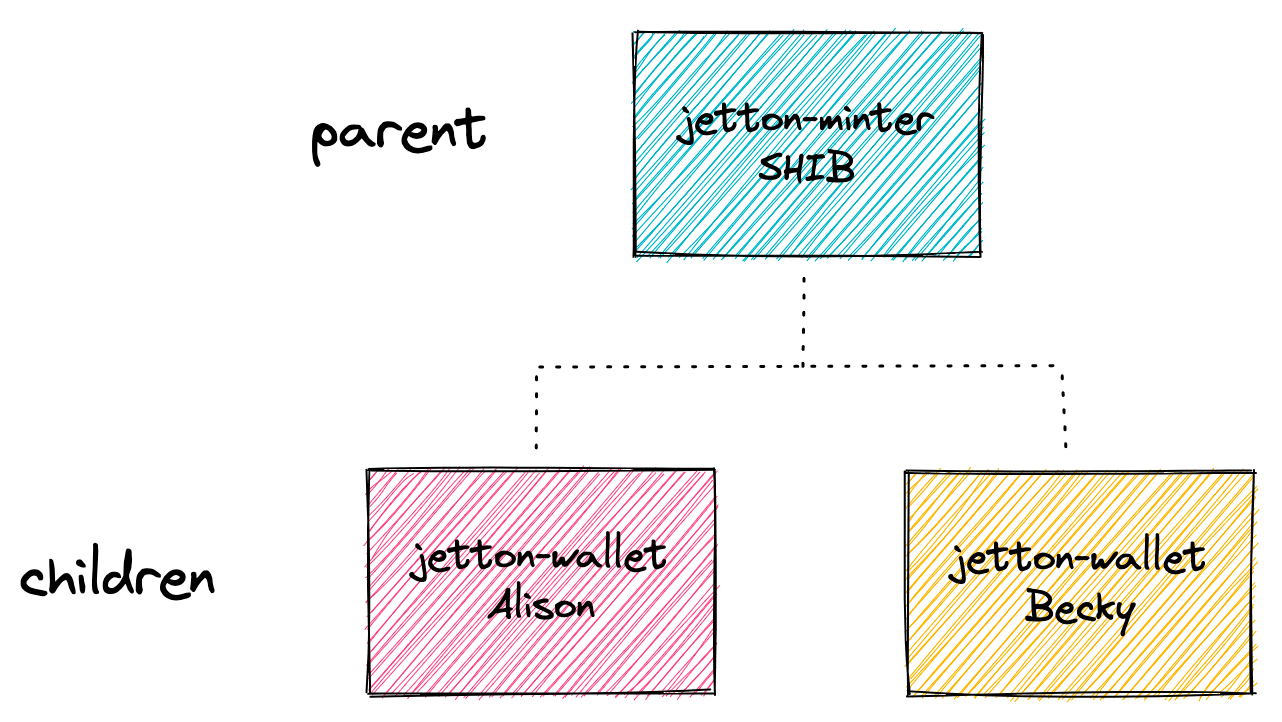 Source: [How to shard your TON smart contract and why - studying the anatomy of TON's Jettons](https://blog.ton.org/how-to-shard-your-ton-smart-contract-and-why-studying-the-anatomy-of-tons-jettons).
### Tutorial code
The GitHub repository with all code written in this tutorial is published [here](https://github.com/chainstacklabs/ton-jetton-tutorial-2).
### Setting up project
Clone the project from the [previous tutorial](/docs/ton-how-to-develop-fungible-tokens-jettons) into your current folder:
```bash Bash theme={"system"}
git clone https://github.com/chainstacklabs/ton-jetton-tutorial-1.git .
```
Next, update the `blueprint.config.ts` file with your Chainstack endpoint. For this tutorial, we will use the testnet:
```typescript TypeScript theme={"system"}
import { Config } from '@ton/blueprint';
export const config: Config = {
network: {
endpoint: 'https://ton-testnet.core.chainstack.com/.../api/v2/jsonRPC',
type: 'testnet',
version: 'v2',
// key: 'YOUR_API_KEY',
},
};
```
To ensure the contracts are set up properly, compile and run the tests using the following commands:
```Text Bash theme={"system"}
npx blueprint build
npx blueprint test
```
## Development
### Contracts
In this section, we will update the minter contract to include a capped supply and token price functionality.
### Adding capped supply and price fields
In the contract storage, we will add two new fields, `capped_supply` and `price`. Here is the updated `load_data` and `save_data` functions:
```c FunC theme={"system"}
(int, int, int, slice, cell, cell) load_data() inline {
slice ds = get_data().begin_parse();
return (
ds~load_coins(), ;; total_supply
ds~load_coins(), ;; capped_supply
ds~load_uint(32), ;; price
ds~load_msg_addr(), ;; admin_address
ds~load_ref(), ;; content
ds~load_ref() ;; jetton_wallet_code
);
}
() save_data(int total_supply, int capped_supply, int price, slice admin_address, cell content, cell jetton_wallet_code) impure inline {
set_data(begin_cell()
.store_coins(total_supply)
.store_coins(capped_supply)
.store_uint(price, 32)
.store_slice(admin_address)
.store_ref(content)
.store_ref(jetton_wallet_code)
.end_cell()
);
}
```
### Updating function calls
Since we have updated the mentioned functions, we now need to update their calls with the respective parameters. Here is an example of the updated getters:
```c FunC theme={"system"}
(int, int, slice, cell, cell) get_jetton_data() method_id {
(int total_supply, _, _, slice admin_address, cell content, cell jetton_wallet_code) = load_data();
return (total_supply, -1, admin_address, content, jetton_wallet_code);
}
slice get_wallet_address(slice owner_address) method_id {
(_, _, _, _, _, cell jetton_wallet_code) = load_data();
return calculate_user_jetton_wallet_address(owner_address, my_address(), jetton_wallet_code);
}
(int, int) get_supply_price() method_id {
(_, int capped_supply, int price, _, _, _) = load_data();
return (capped_supply, price);
}
```
To prevent minting more than the capped supply and ensure that the correct price is applied, we need to modify the `recv_internal` function. We will:
1. Calculate the number of jettons based on the amount of TON sent.
2. Ensure the total minted supply does not exceed the capped supply.
Please note that we need to calculate the buy amount to reserve some TON for storage in the Jetton wallet contract.
```c FunC theme={"system"}
if (op == op::mint()) {
slice to_address = in_msg_body~load_msg_addr();
int buy_amount = msg_value - min_tons_for_storage;
int jetton_amount = muldiv(buy_amount, 1, price);
;; Check if minting exceeds the capped supply
throw_unless(256, total_supply + jetton_amount <= capped_supply);
var mint_request = begin_cell()
.store_uint(op::internal_transfer(), 32)
.store_uint(0, 64)
.store_coins(jetton_amount) ;; max 124 bit
.store_uint(0, 2) ;; from_address, addr_none$00
.store_slice(my_address()) ;; response_address, 3 + 8 + 256 = 267 bit
.store_coins(0) ;; forward_amount, 4 bit if zero
.store_uint(0, 1) ;; no forward_payload, 1 bit
.end_cell();
mint_tokens(to_address, jetton_wallet_code, min_tons_for_storage, mint_request);
save_data(total_supply + jetton_amount, capped_supply, price, admin_address, content, jetton_wallet_code);
return ();
}
```
### Wrappers
### Minter wrapper
Note that in this tutorial, we will only work with the Jetton Minter wrapper.
Next, we will update the wrapper to include the new capped supply and token price functionality. The wrapper will provide functions to retrieve and manipulate these fields.
### Updating minter config
We need to update the configuration type in `JettonMinter.ts` to include the new fields `capped_supply` and `price`.
```typescript TypeScript theme={"system"}
export type JettonMinterConfig = {
admin: Address;
jetton_content: Cell | JettonMinterContent;
wallet_code: Cell;
capped_supply: bigint;
price: bigint;
};
export function jettonMinterConfigToCell(config: JettonMinterConfig): Cell {
const content = config.jetton_content instanceof Cell ? config.jetton_content : jettonContentToCell(config.jetton_content);
return beginCell()
.storeCoins(0)
.storeCoins(config.capped_supply)
.storeUint(config.price, 32)
.storeAddress(config.admin)
.storeRef(content)
.storeRef(config.wallet_code)
.endCell();
}
```
### Updating minting message
In this version, we are packing the jetton minting message within the minter contract itself. This means that our interface now composes a simple message containing the TON amount and the recipient's address.
```typescript TypeScript theme={"system"}
static mintMessage(from: Address, to: Address, query_id: number | bigint = 0) {
return beginCell().storeUint(Op.mint, 32).storeUint(query_id, 64) // op, queryId
.storeAddress(to)
.endCell();
}
async sendMint(provider: ContractProvider, via: Sender, to: Address, forward_ton_amount: bigint, total_ton_amount: bigint) {
if(total_ton_amount < forward_ton_amount) {
throw new Error("Total ton amount should be > forward amount");
}
await provider.internal(via, {
sendMode: SendMode.PAY_GAS_SEPARATELY,
body: JettonMinter.mintMessage(this.address, to),
value: total_ton_amount
});
}
```
### Updating getters
As we added new properties, the getters also must be updated. Note that we modified `getJettonData` and added `getTokenPrice`.
```typescript TypeScript theme={"system"}
async getJettonData(provider: ContractProvider) {
const res = await provider.get('get_jetton_data', []);
const totalSupply = res.stack.readBigNumber();
const mintable = res.stack.readBoolean();
const adminAddress = res.stack.readAddress();
const content = res.stack.readCell();
const walletCode = res.stack.readCell();
return {
totalSupply,
mintable,
adminAddress,
content,
walletCode
};
}
async getWalletAddress(provider: ContractProvider, owner: Address): Promise {
const res = await provider.get('get_wallet_address', [{
type: 'slice',
cell: beginCell().storeAddress(owner).endCell()
}])
return res.stack.readAddress()
}
async getSupplyPrice(provider: ContractProvider) {
const res = await provider.get('get_supply_price', []);
const cappedSupply = res.stack.readBigNumber();
const price = res.stack.readBigNumber();
return {
cappedSupply,
price
}
}
```
### Tests
We will add test cases to verify that the capped supply and token price functionality work as expected.
### Testing minting within capped supply
This test verifies jetton minting based on the TON sent, ensuring the correct jetton amount is minted and updates both user balance and total supply accordingly.
```typescript TypeScript theme={"system"}
it('should mint correct amount of jettons based on the sent TON amount', async () => {
// Calculate costs of minting
const jettonsToPurchase = (await jettonMinter.getSupplyPrice()).cappedSupply;
const jettonsCost = jettonsToPurchase * price;
const amountToSend = jettonsCost + toNano('1'); // Assuming 1 TON for storage fees
const forwardFee = toNano('0.01');
const expectedMintedJettons = jettonsCost / price;
// Retrieve initial balance and supply
const userJettonWallet = await userWallet(user.address);
const initUserJettonBalance = await userJettonWallet.getJettonBalance();
const initJettonSupply = (await jettonMinter.getJettonData()).totalSupply;
// Send the minting message
const res = await jettonMinter.sendMint(
user.getSender(),
user.address,
forwardFee,
amountToSend
);
// Verify the transaction
expect(res.transactions).toHaveTransaction({
on: userJettonWallet.address,
op: Op.internal_transfer,
success: true,
deploy: true
});
// Verify that the user's minted jettons match the expected amount
const currentUserJettonBalance = await userJettonWallet.getJettonBalance();
const mintedUserJettons = currentUserJettonBalance - initUserJettonBalance;
expect(mintedUserJettons).toEqual(expectedMintedJettons);
// Verify that the total supply matches the expected amount of minted jettons
const updatedTotalSupply = (await jettonMinter.getJettonData()).totalSupply;
const mintedTotalSupply = updatedTotalSupply - initJettonSupply;
expect(mintedTotalSupply).toEqual(expectedMintedJettons);
printTransactionFees(res.transactions);
});
```
This test checks that minting beyond the capped supply fails, verifying that the transaction is aborted with the correct exit code.
```typescript TypeScript theme={"system"}
it('should not mint more than capped supply', async () => {
// Calculate costs of minting
const jettonsToPurchase = (await jettonMinter.getSupplyPrice()).cappedSupply + 1n;
const jettonsCost = jettonsToPurchase * price;
const amountToSend = jettonsCost + toNano('1'); // Assuming 1 TON for storage fees
const forwardFee = toNano('0.01');
// Send the minting message
const res = await jettonMinter.sendMint(
user.getSender(),
user.address,
forwardFee,
amountToSend
);
// Verify the transaction
expect(res.transactions).toHaveTransaction({
from: user.address,
to: jettonMinter.address,
aborted: true, // High exit codes are considered to be fatal
exitCode: 256,
});
});
```
To test the contracts using Sandbox, run the command:
```Text Bash theme={"system"}
npx blueprint test
```
### Deployment
In the `scripts` folder, update`deployJettonMinter.ts` with the `capped_supply` and `price` properties:
```typescript TypeScript theme={"system"}
import {toNano} from '@ton/core';
import {JettonMinter} from '../wrappers/JettonMinter';
import {compile, NetworkProvider} from '@ton/blueprint';
import {jettonWalletCodeFromLibrary, promptUrl, promptUserFriendlyAddress} from "../wrappers/ui-utils";
export async function run(provider: NetworkProvider) {
const isTestnet = provider.network() !== 'mainnet';
const ui = provider.ui();
const jettonWalletCodeRaw = await compile('JettonWallet');
const adminAddress = await promptUserFriendlyAddress("Enter the address of the jetton owner (admin):", ui, isTestnet);
const jettonMetadataUri = await promptUrl("Enter jetton metadata uri (https://jettonowner.com/jetton.json)", ui)
const jettonWalletCode = jettonWalletCodeFromLibrary(jettonWalletCodeRaw);
const minter = provider.open(JettonMinter.createFromConfig({
admin: adminAddress.address,
wallet_code: jettonWalletCode,
jetton_content: {type: 1, uri: jettonMetadataUri},
capped_supply: 1000n,
price: toNano('0.01')
},
await compile('JettonMinter'))
);
await minter.sendDeploy(provider.sender(), toNano("1.5")); // send 1.5 TON
}
```
The metadata JSON must have the following format with the image data having base64-encoded value:
```Json JSON theme={"system"}
{
"name": "Example Token",
"description": "Official token",
"symbol": "EXTO",
"decimals": 9,
"image_data": "4bWxuczPHN2ZyB0..."
}
```
To deploy the contracts to the testnet, run the command:
```Text Bash theme={"system"}
npx blueprint run
```
## Conclusion
We walked through the customization of the Jetton token standard on TON, focusing on key update steps using Blueprint and Sandbox. The process involved updating the minter contract, its wrapper, and the associated tests.
### About the author
Source: [How to shard your TON smart contract and why - studying the anatomy of TON's Jettons](https://blog.ton.org/how-to-shard-your-ton-smart-contract-and-why-studying-the-anatomy-of-tons-jettons).
### Tutorial code
The GitHub repository with all code written in this tutorial is published [here](https://github.com/chainstacklabs/ton-jetton-tutorial-2).
### Setting up project
Clone the project from the [previous tutorial](/docs/ton-how-to-develop-fungible-tokens-jettons) into your current folder:
```bash Bash theme={"system"}
git clone https://github.com/chainstacklabs/ton-jetton-tutorial-1.git .
```
Next, update the `blueprint.config.ts` file with your Chainstack endpoint. For this tutorial, we will use the testnet:
```typescript TypeScript theme={"system"}
import { Config } from '@ton/blueprint';
export const config: Config = {
network: {
endpoint: 'https://ton-testnet.core.chainstack.com/.../api/v2/jsonRPC',
type: 'testnet',
version: 'v2',
// key: 'YOUR_API_KEY',
},
};
```
To ensure the contracts are set up properly, compile and run the tests using the following commands:
```Text Bash theme={"system"}
npx blueprint build
npx blueprint test
```
## Development
### Contracts
In this section, we will update the minter contract to include a capped supply and token price functionality.
### Adding capped supply and price fields
In the contract storage, we will add two new fields, `capped_supply` and `price`. Here is the updated `load_data` and `save_data` functions:
```c FunC theme={"system"}
(int, int, int, slice, cell, cell) load_data() inline {
slice ds = get_data().begin_parse();
return (
ds~load_coins(), ;; total_supply
ds~load_coins(), ;; capped_supply
ds~load_uint(32), ;; price
ds~load_msg_addr(), ;; admin_address
ds~load_ref(), ;; content
ds~load_ref() ;; jetton_wallet_code
);
}
() save_data(int total_supply, int capped_supply, int price, slice admin_address, cell content, cell jetton_wallet_code) impure inline {
set_data(begin_cell()
.store_coins(total_supply)
.store_coins(capped_supply)
.store_uint(price, 32)
.store_slice(admin_address)
.store_ref(content)
.store_ref(jetton_wallet_code)
.end_cell()
);
}
```
### Updating function calls
Since we have updated the mentioned functions, we now need to update their calls with the respective parameters. Here is an example of the updated getters:
```c FunC theme={"system"}
(int, int, slice, cell, cell) get_jetton_data() method_id {
(int total_supply, _, _, slice admin_address, cell content, cell jetton_wallet_code) = load_data();
return (total_supply, -1, admin_address, content, jetton_wallet_code);
}
slice get_wallet_address(slice owner_address) method_id {
(_, _, _, _, _, cell jetton_wallet_code) = load_data();
return calculate_user_jetton_wallet_address(owner_address, my_address(), jetton_wallet_code);
}
(int, int) get_supply_price() method_id {
(_, int capped_supply, int price, _, _, _) = load_data();
return (capped_supply, price);
}
```
To prevent minting more than the capped supply and ensure that the correct price is applied, we need to modify the `recv_internal` function. We will:
1. Calculate the number of jettons based on the amount of TON sent.
2. Ensure the total minted supply does not exceed the capped supply.
Please note that we need to calculate the buy amount to reserve some TON for storage in the Jetton wallet contract.
```c FunC theme={"system"}
if (op == op::mint()) {
slice to_address = in_msg_body~load_msg_addr();
int buy_amount = msg_value - min_tons_for_storage;
int jetton_amount = muldiv(buy_amount, 1, price);
;; Check if minting exceeds the capped supply
throw_unless(256, total_supply + jetton_amount <= capped_supply);
var mint_request = begin_cell()
.store_uint(op::internal_transfer(), 32)
.store_uint(0, 64)
.store_coins(jetton_amount) ;; max 124 bit
.store_uint(0, 2) ;; from_address, addr_none$00
.store_slice(my_address()) ;; response_address, 3 + 8 + 256 = 267 bit
.store_coins(0) ;; forward_amount, 4 bit if zero
.store_uint(0, 1) ;; no forward_payload, 1 bit
.end_cell();
mint_tokens(to_address, jetton_wallet_code, min_tons_for_storage, mint_request);
save_data(total_supply + jetton_amount, capped_supply, price, admin_address, content, jetton_wallet_code);
return ();
}
```
### Wrappers
### Minter wrapper
Note that in this tutorial, we will only work with the Jetton Minter wrapper.
Next, we will update the wrapper to include the new capped supply and token price functionality. The wrapper will provide functions to retrieve and manipulate these fields.
### Updating minter config
We need to update the configuration type in `JettonMinter.ts` to include the new fields `capped_supply` and `price`.
```typescript TypeScript theme={"system"}
export type JettonMinterConfig = {
admin: Address;
jetton_content: Cell | JettonMinterContent;
wallet_code: Cell;
capped_supply: bigint;
price: bigint;
};
export function jettonMinterConfigToCell(config: JettonMinterConfig): Cell {
const content = config.jetton_content instanceof Cell ? config.jetton_content : jettonContentToCell(config.jetton_content);
return beginCell()
.storeCoins(0)
.storeCoins(config.capped_supply)
.storeUint(config.price, 32)
.storeAddress(config.admin)
.storeRef(content)
.storeRef(config.wallet_code)
.endCell();
}
```
### Updating minting message
In this version, we are packing the jetton minting message within the minter contract itself. This means that our interface now composes a simple message containing the TON amount and the recipient's address.
```typescript TypeScript theme={"system"}
static mintMessage(from: Address, to: Address, query_id: number | bigint = 0) {
return beginCell().storeUint(Op.mint, 32).storeUint(query_id, 64) // op, queryId
.storeAddress(to)
.endCell();
}
async sendMint(provider: ContractProvider, via: Sender, to: Address, forward_ton_amount: bigint, total_ton_amount: bigint) {
if(total_ton_amount < forward_ton_amount) {
throw new Error("Total ton amount should be > forward amount");
}
await provider.internal(via, {
sendMode: SendMode.PAY_GAS_SEPARATELY,
body: JettonMinter.mintMessage(this.address, to),
value: total_ton_amount
});
}
```
### Updating getters
As we added new properties, the getters also must be updated. Note that we modified `getJettonData` and added `getTokenPrice`.
```typescript TypeScript theme={"system"}
async getJettonData(provider: ContractProvider) {
const res = await provider.get('get_jetton_data', []);
const totalSupply = res.stack.readBigNumber();
const mintable = res.stack.readBoolean();
const adminAddress = res.stack.readAddress();
const content = res.stack.readCell();
const walletCode = res.stack.readCell();
return {
totalSupply,
mintable,
adminAddress,
content,
walletCode
};
}
async getWalletAddress(provider: ContractProvider, owner: Address): Promise {
const res = await provider.get('get_wallet_address', [{
type: 'slice',
cell: beginCell().storeAddress(owner).endCell()
}])
return res.stack.readAddress()
}
async getSupplyPrice(provider: ContractProvider) {
const res = await provider.get('get_supply_price', []);
const cappedSupply = res.stack.readBigNumber();
const price = res.stack.readBigNumber();
return {
cappedSupply,
price
}
}
```
### Tests
We will add test cases to verify that the capped supply and token price functionality work as expected.
### Testing minting within capped supply
This test verifies jetton minting based on the TON sent, ensuring the correct jetton amount is minted and updates both user balance and total supply accordingly.
```typescript TypeScript theme={"system"}
it('should mint correct amount of jettons based on the sent TON amount', async () => {
// Calculate costs of minting
const jettonsToPurchase = (await jettonMinter.getSupplyPrice()).cappedSupply;
const jettonsCost = jettonsToPurchase * price;
const amountToSend = jettonsCost + toNano('1'); // Assuming 1 TON for storage fees
const forwardFee = toNano('0.01');
const expectedMintedJettons = jettonsCost / price;
// Retrieve initial balance and supply
const userJettonWallet = await userWallet(user.address);
const initUserJettonBalance = await userJettonWallet.getJettonBalance();
const initJettonSupply = (await jettonMinter.getJettonData()).totalSupply;
// Send the minting message
const res = await jettonMinter.sendMint(
user.getSender(),
user.address,
forwardFee,
amountToSend
);
// Verify the transaction
expect(res.transactions).toHaveTransaction({
on: userJettonWallet.address,
op: Op.internal_transfer,
success: true,
deploy: true
});
// Verify that the user's minted jettons match the expected amount
const currentUserJettonBalance = await userJettonWallet.getJettonBalance();
const mintedUserJettons = currentUserJettonBalance - initUserJettonBalance;
expect(mintedUserJettons).toEqual(expectedMintedJettons);
// Verify that the total supply matches the expected amount of minted jettons
const updatedTotalSupply = (await jettonMinter.getJettonData()).totalSupply;
const mintedTotalSupply = updatedTotalSupply - initJettonSupply;
expect(mintedTotalSupply).toEqual(expectedMintedJettons);
printTransactionFees(res.transactions);
});
```
This test checks that minting beyond the capped supply fails, verifying that the transaction is aborted with the correct exit code.
```typescript TypeScript theme={"system"}
it('should not mint more than capped supply', async () => {
// Calculate costs of minting
const jettonsToPurchase = (await jettonMinter.getSupplyPrice()).cappedSupply + 1n;
const jettonsCost = jettonsToPurchase * price;
const amountToSend = jettonsCost + toNano('1'); // Assuming 1 TON for storage fees
const forwardFee = toNano('0.01');
// Send the minting message
const res = await jettonMinter.sendMint(
user.getSender(),
user.address,
forwardFee,
amountToSend
);
// Verify the transaction
expect(res.transactions).toHaveTransaction({
from: user.address,
to: jettonMinter.address,
aborted: true, // High exit codes are considered to be fatal
exitCode: 256,
});
});
```
To test the contracts using Sandbox, run the command:
```Text Bash theme={"system"}
npx blueprint test
```
### Deployment
In the `scripts` folder, update`deployJettonMinter.ts` with the `capped_supply` and `price` properties:
```typescript TypeScript theme={"system"}
import {toNano} from '@ton/core';
import {JettonMinter} from '../wrappers/JettonMinter';
import {compile, NetworkProvider} from '@ton/blueprint';
import {jettonWalletCodeFromLibrary, promptUrl, promptUserFriendlyAddress} from "../wrappers/ui-utils";
export async function run(provider: NetworkProvider) {
const isTestnet = provider.network() !== 'mainnet';
const ui = provider.ui();
const jettonWalletCodeRaw = await compile('JettonWallet');
const adminAddress = await promptUserFriendlyAddress("Enter the address of the jetton owner (admin):", ui, isTestnet);
const jettonMetadataUri = await promptUrl("Enter jetton metadata uri (https://jettonowner.com/jetton.json)", ui)
const jettonWalletCode = jettonWalletCodeFromLibrary(jettonWalletCodeRaw);
const minter = provider.open(JettonMinter.createFromConfig({
admin: adminAddress.address,
wallet_code: jettonWalletCode,
jetton_content: {type: 1, uri: jettonMetadataUri},
capped_supply: 1000n,
price: toNano('0.01')
},
await compile('JettonMinter'))
);
await minter.sendDeploy(provider.sender(), toNano("1.5")); // send 1.5 TON
}
```
The metadata JSON must have the following format with the image data having base64-encoded value:
```Json JSON theme={"system"}
{
"name": "Example Token",
"description": "Official token",
"symbol": "EXTO",
"decimals": 9,
"image_data": "4bWxuczPHN2ZyB0..."
}
```
To deploy the contracts to the testnet, run the command:
```Text Bash theme={"system"}
npx blueprint run
```
## Conclusion
We walked through the customization of the Jetton token standard on TON, focusing on key update steps using Blueprint and Sandbox. The process involved updating the minter contract, its wrapper, and the associated tests.
### About the author
 Developer Advocate @ Chainstack
Multiple years of software development and Web3 expertise