> ## Documentation Index
> Fetch the complete documentation index at: https://docs.chainstack.com/llms.txt
> Use this file to discover all available pages before exploring further.
# TON: How to develop fungible tokens (Jettons)
> Develop TON Jettons using TEP-74 standard with Blueprint and Sandbox. Create minter and wallet contracts in FunC for fungible tokens on TON blockchain.
**TLDR:**
* You’ll create a fungible token (Jetton) on TON using a master “minter” contract plus a wallet contract for each user.
* You’ll rely on Blueprint and Sandbox to compile, test, and deploy standard TON FunC contracts.
* You’ll apply the Jetton standard (TEP74) for token transfers and metadata (TEP64) for properties like symbol and decimals.
* By the end, you’ll have a baseline fungible token on the TON testnet ready for any custom logic.
## Main article
In this tutorial, we will discuss the standard implementation of fungible tokens on the TON blockchain and walk through the development steps using the [Blueprint](https://github.com/ton-org/blueprint) environment and [Sandbox](https://github.com/ton-org/sandbox).
### Run nodes on Chainstack
[Start for free](https://console.chainstack.com/) and get your app to production levels immediately. No credit card required. You can sign up with your GitHub, X, Google, or Microsoft account.
## Introduction
The suggested approach for fungible tokens on TON involves having a minter contract (also called a master contract) and a specific wallet contract for each user. This allows taking advantage of the TON blockchain architecture and its sharding feature.
The minter contract holds key token metrics and parameters, while the wallet contract maintains a balance of a specific user and allows transferring and burning tokens. This is described in more detail in the TON standards ([TEPs](https://github.com/ton-blockchain/TEPs/)). Let’s examine those related to fungible tokens.
### Jetton standard
TON fungible tokens are called Jettons. The Jetton standard is described in [TEP74](https://github.com/ton-blockchain/TEPs/blob/master/text/0074-jettons-standard.md). The specification for metadata of all tokens on TON is in [TEP64](https://github.com/ton-blockchain/TEPs/blob/master/text/0064-token-data-standard.md). The Jetton standard (TEP74) describes:
1. The method for Jetton transfers.
2. How to retrieve common information (name, circulating supply, etc.) about a given Jetton asset.
Jettons are organized as follows: each Jetton has a master smart contract used to mint new Jettons, account for circulating supply, and provide common information. At the same time, information about the amount of jettons owned by each user is stored in a decentralized manner in individual smart contracts (referred to as “Jetton-wallets”) for each owner.
[An example of the Jetton minter and wallet contracts](https://github.com/ton-blockchain/token-contract/tree/main/ft) has been prepared by the TON core team. We will take these contracts as a starting point for our development.
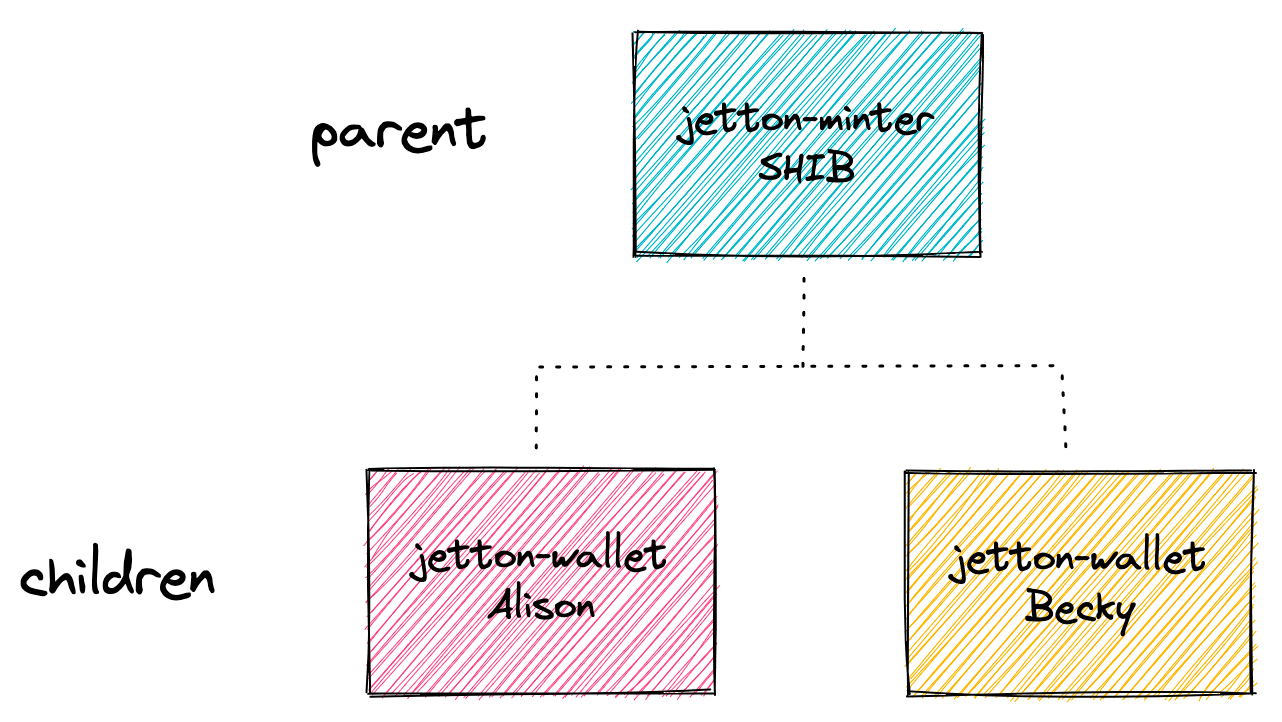 Source: [How to shard your TON smart contract and why - studying the anatomy of TON's Jettons](https://blog.ton.org/how-to-shard-your-ton-smart-contract-and-why-studying-the-anatomy-of-tons-jettons).
### Tutorial code
The GitHub repository with all code written in this tutorial is published [here](https://github.com/chainstacklabs/ton-jetton-tutorial-1).
## Development
### Contracts
Let’s create an empty Blueprint project with FunC in the current folder:
```bash Bash theme={"system"}
npm create ton@latest .
```
After that, create the `blueprint.config.ts` file and paste your Chainstack endpoint. In this tutorial, we work with the testnet:
```typescript TypeScript theme={"system"}
import { Config } from '@ton/blueprint';
export const config: Config = {
network: {
endpoint: 'https://ton-testnet.core.chainstack.com/.../api/v2/jsonRPC',
type: 'testnet',
version: 'v2',
// key: 'YOUR_API_KEY',
},
};
```
Then, let’s copy the contracts from [the standard implementation](https://github.com/ton-blockchain/token-contract/tree/main/ft) to our project’s `contracts` folder. We need `jetton-minter-discoverable.fc`, `jetton-wallet.fc` and `jetton-utils.fc`, `discovery-params.fc`, `op-codes.fc`, `params.fc`. Let’s briefly walk through them.
The minter contract allows the admin (the contract owner) to manage the minting process and total tupply. Additionally, it implements the [TEP89](https://github.com/ton-blockchain/TEPs/blob/master/text/0089-jetton-wallet-discovery.md) feature for Jetton wallet discovery, which simplifies obtaining a Jetton wallet address by other smart contracts. Previously, this was challenging because contracts couldn't use get methods on other contracts directly.
The wallet contract manages Jetton token transfers, storage, and burning for a specific user. It tracks the wallet balance, owner’s address, and Jetton master details, updating the data after transfers or burns.
The `jetton-utils.fc` file contains functions that help in creating and managing a Jetton wallet, making sure that all the necessary data is packed and that the correct address for the wallet is calculated.
The `discovery-params.fc`, `op-code.fc` files contain the standard operational codes for the minter and wallet contracts. Additionally, the function `is_resolvable` checks if a given address is within the same workchain as the contract. It extracts the workchain ID from the address and compares it with the current contract's workchain ID. The `params.fc` also contains the same check that is used by the wallet contract.
Before proceeding, please make sure your contracts include required imports.
`jetton-minter-discoverable.fc`
```c C theme={"system"}
#include "imports/stdlib.fc";
#include "jetton-utils.fc";
#include "discovery-params.fc";
#include "op-codes.fc";
```
`jetton-wallet.fc`
```c C theme={"system"}
#include "jetton-utils.fc";
#include "op-codes.fc";
```
`jetton-utils.fc`
```c C theme={"system"}
#include "params.fc";
```
`params.fc`
```c C theme={"system"}
#include "imports/stdlib.fc";
```
To check that everything is alright, please try to compile the contracts:
1. In the folder `wrappers` create or update the compile files:
`JettonMinter.compile.ts`
```typescript TypeScript theme={"system"}
import { CompilerConfig } from '@ton/blueprint';
export const compile: CompilerConfig = {
lang: 'func',
targets: [
'contracts/jetton-minter-discoverable.fc'
],
};
```
`JettonWallet.compile.ts`
```typescript TypeScript theme={"system"}
import { CompilerConfig } from '@ton/blueprint';
export const compile: CompilerConfig = {
lang: 'func',
targets: [
'contracts/jetton-wallet.fc'
],
};
```
2. Run the command `build`:
```bash Bash theme={"system"}
npx blueprint build
```
## Wrappers
To test and run scripts for our smart contracts, we need to have TypeScript interfaces for them. The `wrappers` folder contains such interface classes for all contracts (implementing `Contract` from `@ton/core`), including serialization primitives, getter wrappers and compilation functions.
Let’s copy the wrappers, `JettonMinter.ts`, `JettonWallet.ts`, `JettonConstants.ts` and `ui-utils.ts`, from [the existing implementation](https://github.com/ton-blockchain/token-contract/tree/main/wrappers) to our project’s folder `wrappers`. You can also copy the shortened versions of the same files from [our repository](https://github.com/chainstacklabs/ton-jetton-tutorial-1). Additionally, `ui-utils.ts` has a few adjustments there.
## Tests and deployment
The Blueprint framework incorporates [Sandbox](https://github.com/ton-org/sandbox). The package allows developers to emulate TON smart contracts behaviour as if they were deployed on a real network. Please copy the tests from [our repository](https://github.com/chainstacklabs/ton-jetton-tutorial-1). As in the case with the wrappers, it’s a shortened version with a few adjustments based on examples prepared by the TON core team ([here](https://github.com/ton-blockchain/token-contract/tree/main/sandbox_tests) and [here](https://github.com/ton-blockchain/stablecoin-contract/tree/main/sandbox_tests)).
To test the contracts using Sandbox, run the command:
```Text Bash theme={"system"}
npx blueprint test
```
In the `scripts` folder, create `deployJettonMinter.ts` with the following code:
```typescript TypeScript theme={"system"}
import {toNano} from '@ton/core';
import {JettonMinter} from '../wrappers/JettonMinter';
import {compile, NetworkProvider} from '@ton/blueprint';
import {jettonWalletCodeFromLibrary, promptUrl, promptUserFriendlyAddress} from "../wrappers/ui-utils";
export async function run(provider: NetworkProvider) {
const isTestnet = provider.network() !== 'mainnet';
const ui = provider.ui();
const jettonWalletCodeRaw = await compile('JettonWallet');
const adminAddress = await promptUserFriendlyAddress("Enter the address of the jetton owner (admin):", ui, isTestnet);
const jettonMetadataUri = await promptUrl("Enter jetton metadata uri (https://jettonowner.com/jetton.json)", ui)
const jettonWalletCode = jettonWalletCodeFromLibrary(jettonWalletCodeRaw);
const minter = provider.open(JettonMinter.createFromConfig({
admin: adminAddress.address,
wallet_code: jettonWalletCode,
jetton_content: {type: 1, uri: jettonMetadataUri}
},
await compile('JettonMinter'))
);
await minter.sendDeploy(provider.sender(), toNano("1.5")); // send 1.5 TON
}
```
The metadata JSON must have the following format with the image data having base64-encoded value:
```Json JSON theme={"system"}
{
"name": "Example Token",
"description": "Official token",
"symbol": "EXTO",
"decimals": 9,
"image_data": "4bWxuczPHN2ZyB0..."
}
```
To deploy the contracts to the testnet, run the command:
```Text Bash theme={"system"}
npx blueprint run
```
## Conclusion
We walked through the fungible token standard on the TON blockchain and its main development steps using Blueprint and Sandbox. In future tutorials, we will add custom behaviour for our token. Stay tuned!
### About the author
Source: [How to shard your TON smart contract and why - studying the anatomy of TON's Jettons](https://blog.ton.org/how-to-shard-your-ton-smart-contract-and-why-studying-the-anatomy-of-tons-jettons).
### Tutorial code
The GitHub repository with all code written in this tutorial is published [here](https://github.com/chainstacklabs/ton-jetton-tutorial-1).
## Development
### Contracts
Let’s create an empty Blueprint project with FunC in the current folder:
```bash Bash theme={"system"}
npm create ton@latest .
```
After that, create the `blueprint.config.ts` file and paste your Chainstack endpoint. In this tutorial, we work with the testnet:
```typescript TypeScript theme={"system"}
import { Config } from '@ton/blueprint';
export const config: Config = {
network: {
endpoint: 'https://ton-testnet.core.chainstack.com/.../api/v2/jsonRPC',
type: 'testnet',
version: 'v2',
// key: 'YOUR_API_KEY',
},
};
```
Then, let’s copy the contracts from [the standard implementation](https://github.com/ton-blockchain/token-contract/tree/main/ft) to our project’s `contracts` folder. We need `jetton-minter-discoverable.fc`, `jetton-wallet.fc` and `jetton-utils.fc`, `discovery-params.fc`, `op-codes.fc`, `params.fc`. Let’s briefly walk through them.
The minter contract allows the admin (the contract owner) to manage the minting process and total tupply. Additionally, it implements the [TEP89](https://github.com/ton-blockchain/TEPs/blob/master/text/0089-jetton-wallet-discovery.md) feature for Jetton wallet discovery, which simplifies obtaining a Jetton wallet address by other smart contracts. Previously, this was challenging because contracts couldn't use get methods on other contracts directly.
The wallet contract manages Jetton token transfers, storage, and burning for a specific user. It tracks the wallet balance, owner’s address, and Jetton master details, updating the data after transfers or burns.
The `jetton-utils.fc` file contains functions that help in creating and managing a Jetton wallet, making sure that all the necessary data is packed and that the correct address for the wallet is calculated.
The `discovery-params.fc`, `op-code.fc` files contain the standard operational codes for the minter and wallet contracts. Additionally, the function `is_resolvable` checks if a given address is within the same workchain as the contract. It extracts the workchain ID from the address and compares it with the current contract's workchain ID. The `params.fc` also contains the same check that is used by the wallet contract.
Before proceeding, please make sure your contracts include required imports.
`jetton-minter-discoverable.fc`
```c C theme={"system"}
#include "imports/stdlib.fc";
#include "jetton-utils.fc";
#include "discovery-params.fc";
#include "op-codes.fc";
```
`jetton-wallet.fc`
```c C theme={"system"}
#include "jetton-utils.fc";
#include "op-codes.fc";
```
`jetton-utils.fc`
```c C theme={"system"}
#include "params.fc";
```
`params.fc`
```c C theme={"system"}
#include "imports/stdlib.fc";
```
To check that everything is alright, please try to compile the contracts:
1. In the folder `wrappers` create or update the compile files:
`JettonMinter.compile.ts`
```typescript TypeScript theme={"system"}
import { CompilerConfig } from '@ton/blueprint';
export const compile: CompilerConfig = {
lang: 'func',
targets: [
'contracts/jetton-minter-discoverable.fc'
],
};
```
`JettonWallet.compile.ts`
```typescript TypeScript theme={"system"}
import { CompilerConfig } from '@ton/blueprint';
export const compile: CompilerConfig = {
lang: 'func',
targets: [
'contracts/jetton-wallet.fc'
],
};
```
2. Run the command `build`:
```bash Bash theme={"system"}
npx blueprint build
```
## Wrappers
To test and run scripts for our smart contracts, we need to have TypeScript interfaces for them. The `wrappers` folder contains such interface classes for all contracts (implementing `Contract` from `@ton/core`), including serialization primitives, getter wrappers and compilation functions.
Let’s copy the wrappers, `JettonMinter.ts`, `JettonWallet.ts`, `JettonConstants.ts` and `ui-utils.ts`, from [the existing implementation](https://github.com/ton-blockchain/token-contract/tree/main/wrappers) to our project’s folder `wrappers`. You can also copy the shortened versions of the same files from [our repository](https://github.com/chainstacklabs/ton-jetton-tutorial-1). Additionally, `ui-utils.ts` has a few adjustments there.
## Tests and deployment
The Blueprint framework incorporates [Sandbox](https://github.com/ton-org/sandbox). The package allows developers to emulate TON smart contracts behaviour as if they were deployed on a real network. Please copy the tests from [our repository](https://github.com/chainstacklabs/ton-jetton-tutorial-1). As in the case with the wrappers, it’s a shortened version with a few adjustments based on examples prepared by the TON core team ([here](https://github.com/ton-blockchain/token-contract/tree/main/sandbox_tests) and [here](https://github.com/ton-blockchain/stablecoin-contract/tree/main/sandbox_tests)).
To test the contracts using Sandbox, run the command:
```Text Bash theme={"system"}
npx blueprint test
```
In the `scripts` folder, create `deployJettonMinter.ts` with the following code:
```typescript TypeScript theme={"system"}
import {toNano} from '@ton/core';
import {JettonMinter} from '../wrappers/JettonMinter';
import {compile, NetworkProvider} from '@ton/blueprint';
import {jettonWalletCodeFromLibrary, promptUrl, promptUserFriendlyAddress} from "../wrappers/ui-utils";
export async function run(provider: NetworkProvider) {
const isTestnet = provider.network() !== 'mainnet';
const ui = provider.ui();
const jettonWalletCodeRaw = await compile('JettonWallet');
const adminAddress = await promptUserFriendlyAddress("Enter the address of the jetton owner (admin):", ui, isTestnet);
const jettonMetadataUri = await promptUrl("Enter jetton metadata uri (https://jettonowner.com/jetton.json)", ui)
const jettonWalletCode = jettonWalletCodeFromLibrary(jettonWalletCodeRaw);
const minter = provider.open(JettonMinter.createFromConfig({
admin: adminAddress.address,
wallet_code: jettonWalletCode,
jetton_content: {type: 1, uri: jettonMetadataUri}
},
await compile('JettonMinter'))
);
await minter.sendDeploy(provider.sender(), toNano("1.5")); // send 1.5 TON
}
```
The metadata JSON must have the following format with the image data having base64-encoded value:
```Json JSON theme={"system"}
{
"name": "Example Token",
"description": "Official token",
"symbol": "EXTO",
"decimals": 9,
"image_data": "4bWxuczPHN2ZyB0..."
}
```
To deploy the contracts to the testnet, run the command:
```Text Bash theme={"system"}
npx blueprint run
```
## Conclusion
We walked through the fungible token standard on the TON blockchain and its main development steps using Blueprint and Sandbox. In future tutorials, we will add custom behaviour for our token. Stay tuned!
### About the author
 Developer Advocate @ Chainstack
Multiple years of software development and Web3 expertise